Fashion Fever
What is Fashion Fever?
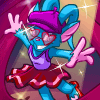
These models are in need of some high fashion. In Fashion Fever, help the models wear the most stylish outfit of your choosing with preselected customisation items.
Since this is a site feature that gives out neopoint rewards and prizes, you may not play Fashion Fever on your side accounts. For more information look at our side accounts guide. You must also choose one version of the game to play per day. Playing both original and HTML5 versions on the same day is not allowed.
How to Play
Fashion is everything in this game. You are given a choice of what color model you'd like as your model and different types of customisable items that you can use to dress them up. Once you've dressed up your model, you can "Send Score" and earn an automatic 300 Neopoints. Like other games, you can do this a total of three (3) times a day.
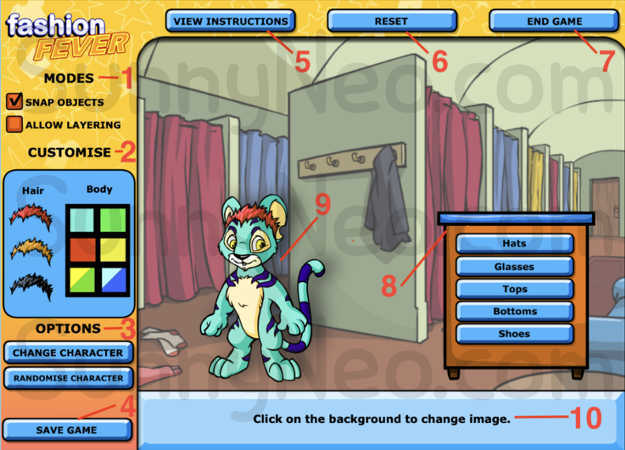
| | There are two modes to choose from when dressing up your model: Snap Objects and Allow Layering. The former snaps items into place on the model. For example, if you chose a stylish hat, once you drag it anywhere on your model, it will snap the item on top of their head. The latter does not forcefully place the item. Instead, you can place items anywhere around the model. For example, if you chose a stylish hat, once you drag it anywhere on your model, it will stay there and not go to their head. You can also choose more than one item of the same category to place on your model. This allows you to layer items on your model. |
| | To start your model, there are six (6) different colors you can choose from: green, blue, yellow, red, disco and striped; and there are three (3) different hair colors to choose from: red, yellow and black. |
| | Under this category, you can choose to change your model between a Kougra, Acara or Lupe via "Change Character." You can also allow the game to randomly customise your model with the various preselected customisable items. |
| | Need a break from all that fashion? You can save the game and come back later. In order to come back to the same fashion fever game, you must click "Load Game" at the beginning of the game (rather than clicking "Start Game"). |
| | If you are confused about what to do, they have an instruction manual in-game ready for you! |
| | Sometimes getting into the Fashion Fever means a lot of items are placed on your model. Instead of taking off each item, just click the reset button to start over. |
| | Pretty self-explanatory. When you're happy with your customised model, click "End Game" to send your score. |
| | This is the wardrobe where all your model's clothing are kept. Click between the different styles of clothing and the wardrobe will open revealing different items in that category. The category of clothing include hats, glasses, tops, bottoms and shoes. When the wardrobe is open, you can click and drag each item onto your model. To close the wardrobe, click the edge of the open drawer. |
| | This is your model. Click on your model to change between three Neopets: Lupe, Kougra and Acara. |
| | Fashion needs the right environment. Click the backdrop behind the model to change the background. Backgrounds include the Fashion Fever Closet, Haunted Woods, Mystery Island, Krawk Island and Merridell. |
Strategy
An item is all you need
Unless you want to test out your fashion designer skills, this isn't a game that most spend a lot of time on. Place at least one item onto your model and press "End Game" to send score. You can earn a total of 900 Neopoints instantly in less than 30 seconds in a day.

 {{ loadingMessage || 'Loading, one moment please'}}